First — what happens when someone submits the form?
Go to your website, fill in the contact form, and press submit. Watch the coloured message that appears below the button.
Want to read through the fixes instead?
Start with #1 below — it solves the problem for most sites.
How This Guide Works
We've created a unique tool to help you troubleshoot and fix issues with Contact Form 7, so we highly recommend using the tool immediately above.
However, if you prefer to read through the most common issues, see below.
We've ordered these fixes by how often they solve the problem.
Start at #1. If that doesn't fix it, move to #2, and so on. Most people don't need to go past #3.
Fix #1: Install an SMTP Plugin (solves it for ~70% of sites)
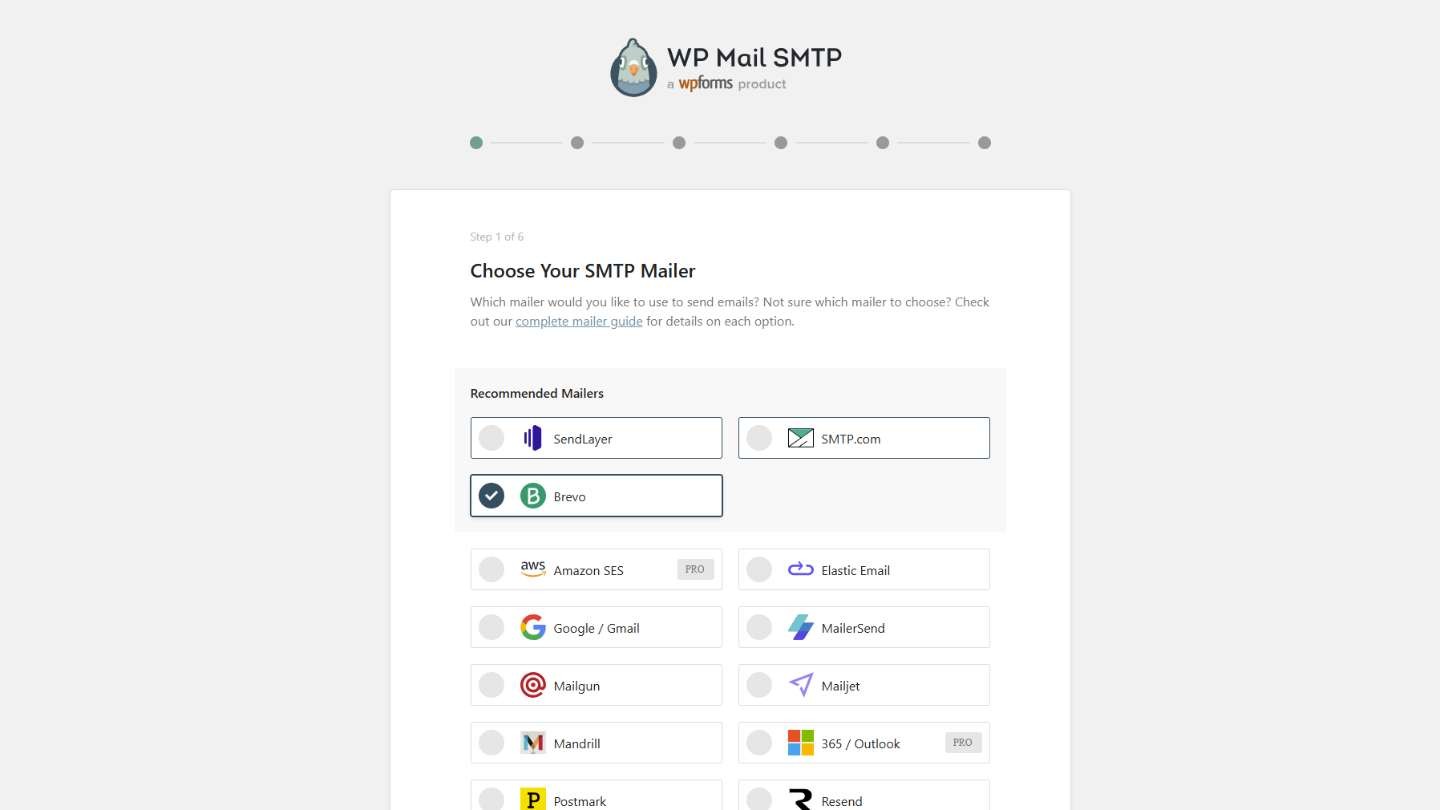
WordPress's built-in email system is unreliable. Most hosting providers don't configure it properly, so emails silently vanish. Replacing it takes about 15 minutes.
Steps:
Install the free WP Mail SMTP plugin (Plugins → Add New → search "WP Mail SMTP")
Sign up for a free email delivery service — Brevo (300 emails/day free) or Mailgun (1,000/month free) are the easiest
In WP Mail SMTP settings, enter the host, port, username, and password from your email service
Click "Send Test Email" — if it arrives, you're done
If the test email works but CF7 still isn't delivering, move to Fix #2.
Fix #2: Fix the "From" Address in CF7's Mail Tab
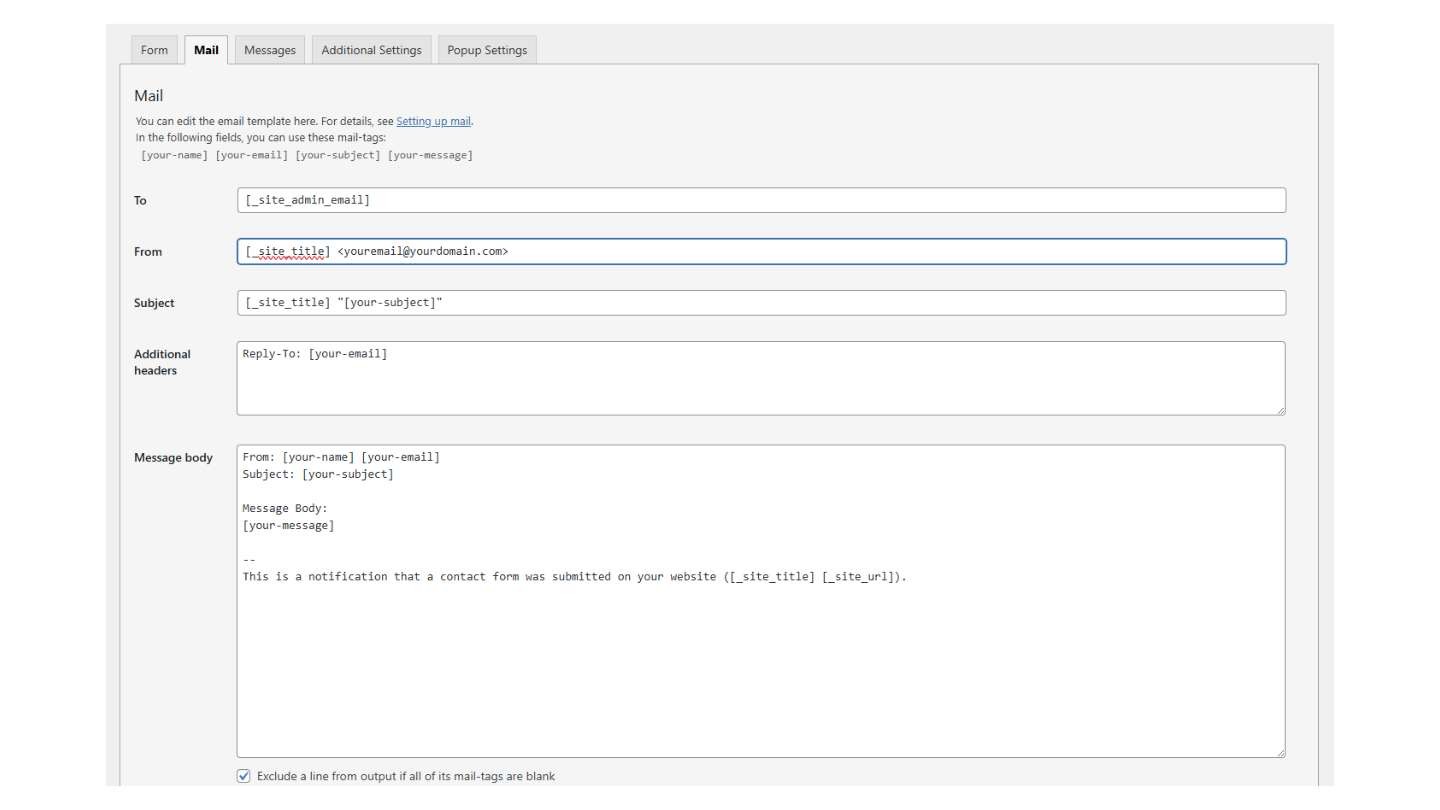
This is the #1 configuration mistake. If your From field contains [your-email] or a Gmail/Yahoo address, most email providers will silently delete your form emails.
Steps:
Go to Contact → Contact Forms → Edit your form → Mail tab
Change the From field to:
Your Site Name <forms@yourdomain.com>(must be your own domain)In the Additional Headers box, add:
Reply-To: [your-email]— this lets you still reply directly to the visitorSave and test
Fix #3: Check CF7's Configuration Warnings
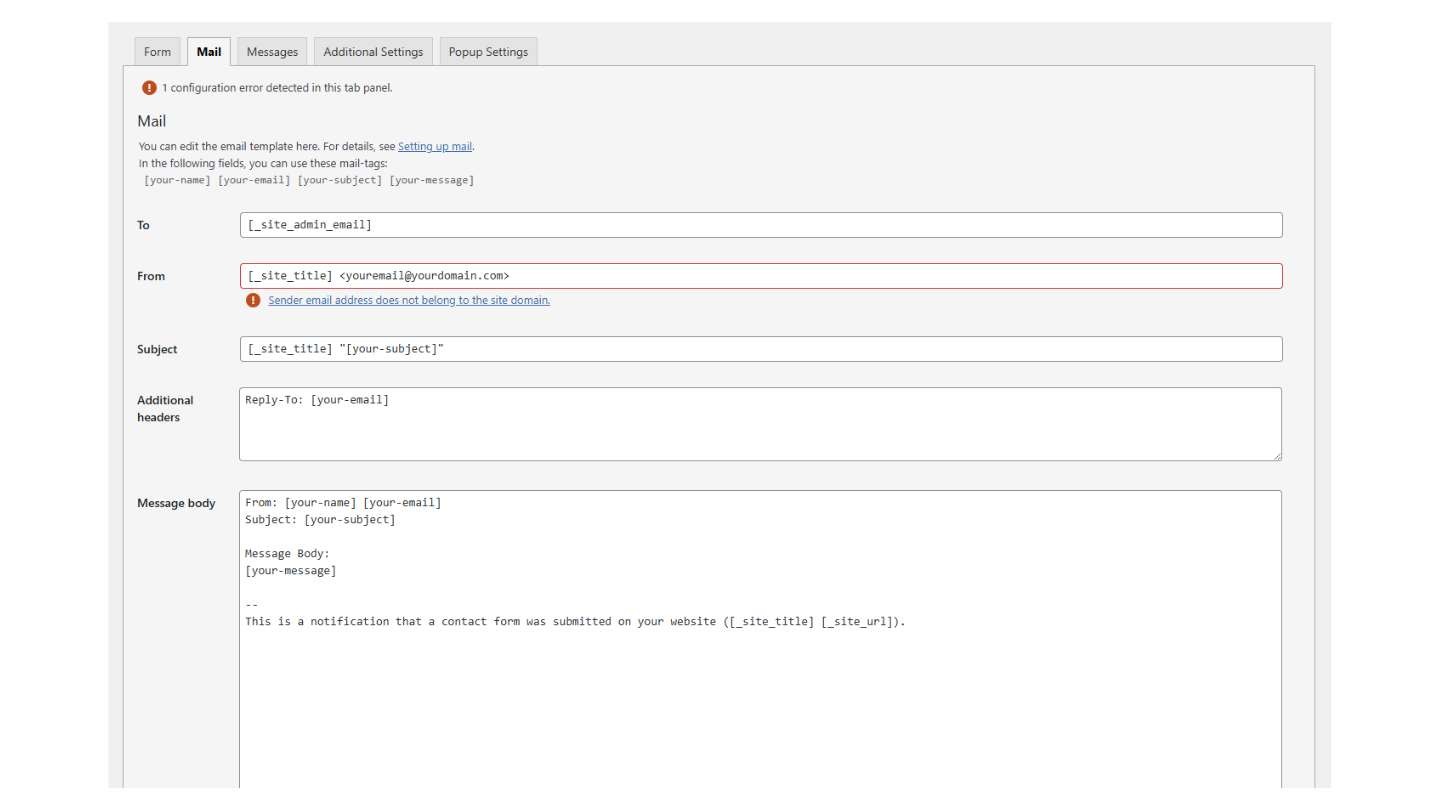
CF7 has a built-in error checker that highlights exactly what's wrong — but many people don't notice it.
Steps:
Go to Contact → Contact Forms in WordPress admin
Look for a red or yellow warning banner at the top — if you see one, click to validate
Open your form → Mail tab → look for red-highlighted fields
What the common warnings mean and how to fix them:
"Invalid mailbox syntax" — your email format is wrong. Use
you@domain.comorName <you@domain.com>with angle brackets"Sender email does not belong to the site domain" — change the From address to an email on your own domain
"Possible empty field" — you're using a form tag in the Subject line but the field isn't required. Either make it required or use a fixed subject
Message body is blank — paste your form tags back in:
[your-name],[your-email],[your-message]
Fix #4: Orange Message? It's a Spam Filter Problem, Not Email
If the form shows an orange message, it's rejecting submissions as spam — the email system is never even involved.
Steps:
Go to Contact → Integration
If you see reCAPTCHA v3 keys, remove them — v3 silently blocks real people far too often
Set up reCAPTCHA v2 (the "I'm not a robot" checkbox) or Cloudflare Turnstile instead
If you use Akismet, CleanTalk, or Antispam Bee, temporarily deactivate each and test
Fix #5: Form Hangs or Spinner Never Stops? It's a REST API Block
If the form hangs when you submit and eventually fails, something is blocking the form from reaching your server.
Steps:
Test the connection: visit
yoursite.com/wp-json/contact-form-7/v1/contact-formsin your browser — if you get an error, the REST API is blockedDeactivate security plugins one at a time (Wordfence, Sucuri, iThemes Security) and test after each
If you use a caching plugin, exclude
/wp-json/from the cacheIf you use Cloudflare, add a firewall rule to allow
/wp-json/*Press F12 in your browser → Console tab → submit the form — red errors point to a JS conflict
Fix #6: Emails Landing in Spam? Set Up Domain Authentication
If your emails arrive but land in spam, your domain is missing authentication records.
Steps:
Add an SPF record to your domain's DNS (your email service provides the exact value)
Add a DKIM record (also provided by your email service)
Add a DMARC record:
v=DMARC1; p=none;Test your score at mail-tester.com — aim for 9/10 or higher
Your email delivery service (Brevo, Mailgun, etc.) will walk you through each of these during setup.
Fix #7: SMTP Test Works, No CF7 Warnings, But Emails Still Vanish
This is the trickiest scenario. Everything looks fine but emails silently disappear. Check these five hidden causes in order:
1. "Force From Email" is turned off
Your SMTP plugin has a "Force From Email" setting. If it's off, CF7 sends with its own From address, which may not match what your SMTP provider expects. The test email works because it uses the correct address.
→ Fix: Turn on "Force From Email" in your SMTP plugin settings.
2. Same-domain routing issue
If you're sending to an email on your own domain (like hello@yourdomain.com) but your email is hosted by Google Workspace or Microsoft 365, your web server may deliver locally instead of routing externally.
→ Fix: Ask your host to set email routing to "Remote" (in cPanel: Email Routing).
3. Plugin interference
Another plugin is secretly intercepting WordPress's email function.
→ Fix: Deactivate all plugins except CF7 and your SMTP plugin. Test. Reactivate one by one to find the culprit.
4. WP-Cron queue stuck
Some SMTP plugins queue emails instead of sending immediately. If WP-Cron is broken, emails sit in the queue forever.
→ Fix: Check your SMTP plugin for a "Pending" or "Queue" section. Check wp-config.php for DISABLE_WP_CRON — if it's true, you need a real server cron job.
5. Recipient's server is blocking it
Everything's fine on your end, but the recipient's email server (especially corporate or university systems) silently filters the message.
→ Fix: Ask the recipient to check quarantine/junk filters and whitelist your domain. Test by sending to a different email address.
Safety Net: Never Lose a Submission
Install the free Flamingo plugin. It saves every CF7 submission to your WordPress database — so even if email delivery fails, you still have the data.
Go to Plugins → Add New → search "Flamingo" → install and activate. Submissions appear under Flamingo → Inbound Messages.
Stop Finding Out Too Late
Every fix on this page works - once you know there's a problem. But most broken forms don't announce themselves. The form still looks fine. Visitors still see a success message. You just stop receiving emails and don't realise for days or weeks.
Form Doctor monitors your contact forms around the clock and alerts you the moment something breaks - before you lose leads.
FAQ
Why is my Contact Form 7 not sending emails? Most likely your web server's email function isn't configured properly. Install WP Mail SMTP and connect it to Brevo or Mailgun (both free). This fixes it for the majority of sites.
CF7 shows a green success message but no email arrives. What's wrong? The form submitted successfully but the email failed silently. Install an SMTP plugin, check your spam folder, and make sure the From address in CF7's Mail tab uses your own domain — not [your-email] or a Gmail address.
What does the orange border message mean? Your submission was rejected as spam, usually by reCAPTCHA v3. Switch to reCAPTCHA v2 or Cloudflare Turnstile.
What should the "From" field look like in CF7's Mail tab? Your Site Name <forms@yourdomain.com> — always use your own domain. Put Reply-To: [your-email] in Additional Headers if you want to reply to the visitor.
My SMTP test works but CF7 emails don't arrive. Why? Turn on "Force From Email" in your SMTP plugin so it overrides CF7's From address with your verified sender. Also check if you're sending to your own domain with external email hosting — ask your host to set routing to "Remote."
How do I stop CF7 emails going to spam? Add SPF, DKIM, and DMARC DNS records to your domain. Your email service will guide you through this. Test at mail-tester.com — aim for 9/10 or higher.
Can I save CF7 submissions without email? Yes. Install the free Flamingo plugin. It saves every submission to your WordPress database as a backup.
How often should I test my forms? After every plugin update, theme change, or hosting migration. Or use Form Doctor to test automatically on a schedule.