First — what happens when someone submits the form?
Go to your website, fill in your WPForms contact form, and press submit. Watch what happens.
Want to read through the fixes instead? Start with #1 below — it solves the problem for most sites.
How This Guide Works
We've ordered these fixes by how often they solve the problem. Start at #1. If that doesn't fix it, move to #2, and so on. Most people don't need to go past #3.
Fix #1 — Install an SMTP Plugin
(Solves ~70% of cases:)
WordPress's built-in email system doesn't work properly on most hosting providers. Emails silently vanish. The form says "thanks" but nothing arrives.
Steps:
Go to Plugins → Add New, search for "WP Mail SMTP", install and activate it
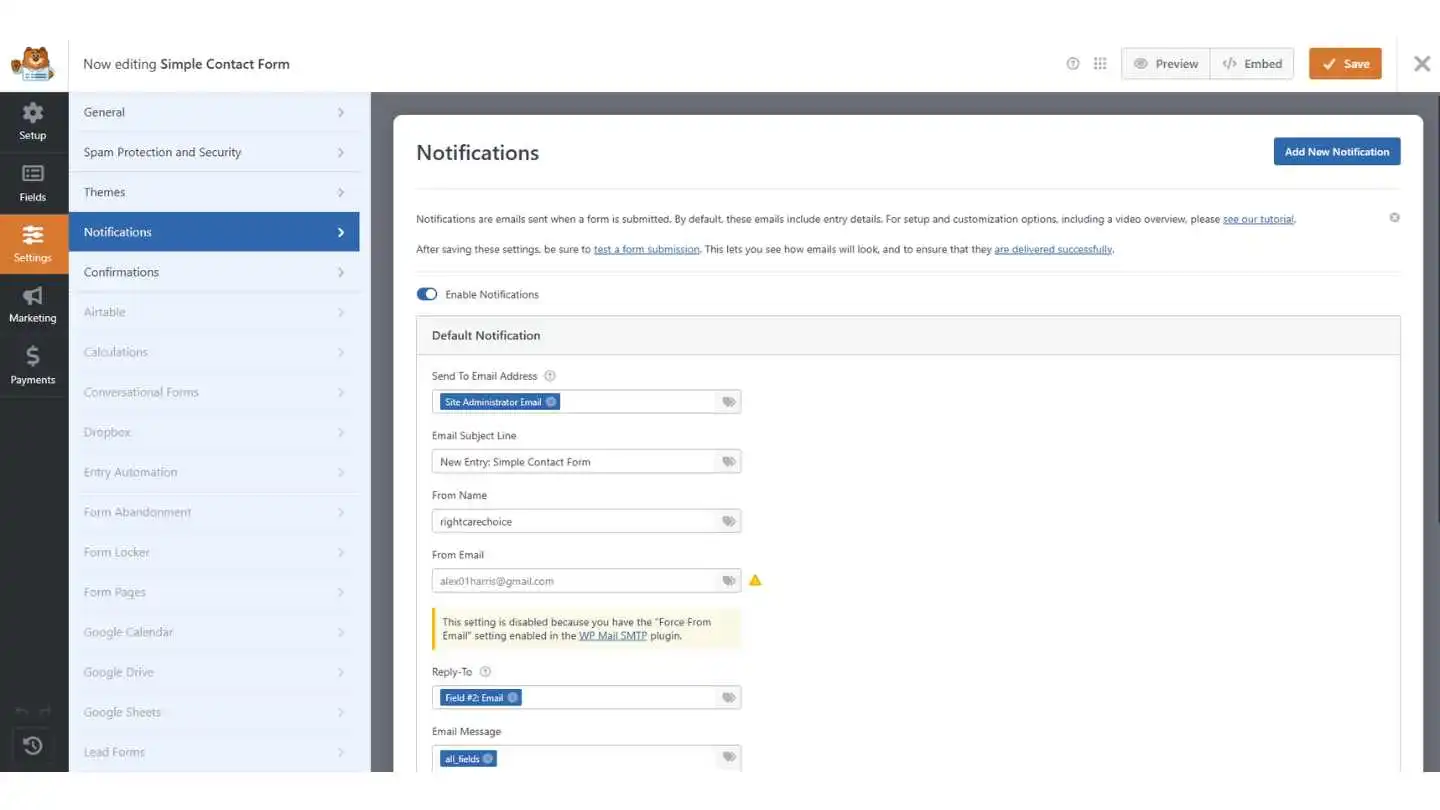
The setup wizard asks you to pick a mailer — choose Brevo (free, 300 emails/day, no credit card)
Follow the steps to connect your Brevo account — you'll paste in an API key
Go to WP Mail SMTP → Tools → Email Test and send a test
If it arrives, you're done — your forms will start working
Still not working? Move to Fix #2.
Fix #2 — Most common WPForms-specific issue -Check That Notifications Are Turned On
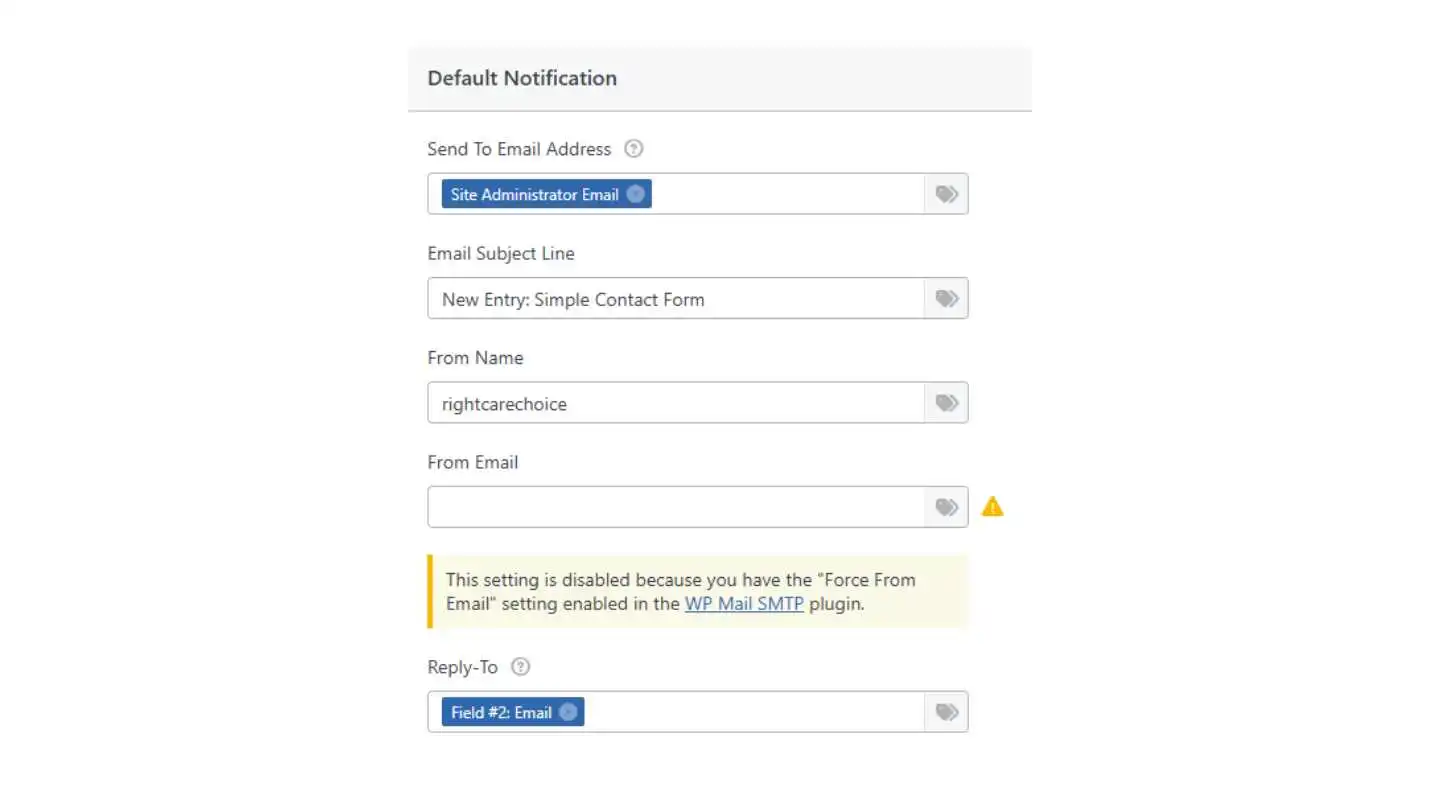
Every form in WPForms has its own notification toggle, and it might be switched off without you realising. No toggle = no emails sent at all.
Steps:
Go to WPForms → All Forms and click Edit on your form
Click Settings → Notifications in the left sidebar
Make sure "Enable Notifications" is toggled ON at the top
Check the badge next to each notification — if it says "DEACTIVATE" (greyed out), click it to switch it back to "ACTIVE"
Click Save and submit a test entry
Fix #3 — Check the Email Addresses in Your Notification Settings
A typo, a wrong address, or a missing comma is all it takes for emails to silently disappear.
Steps:
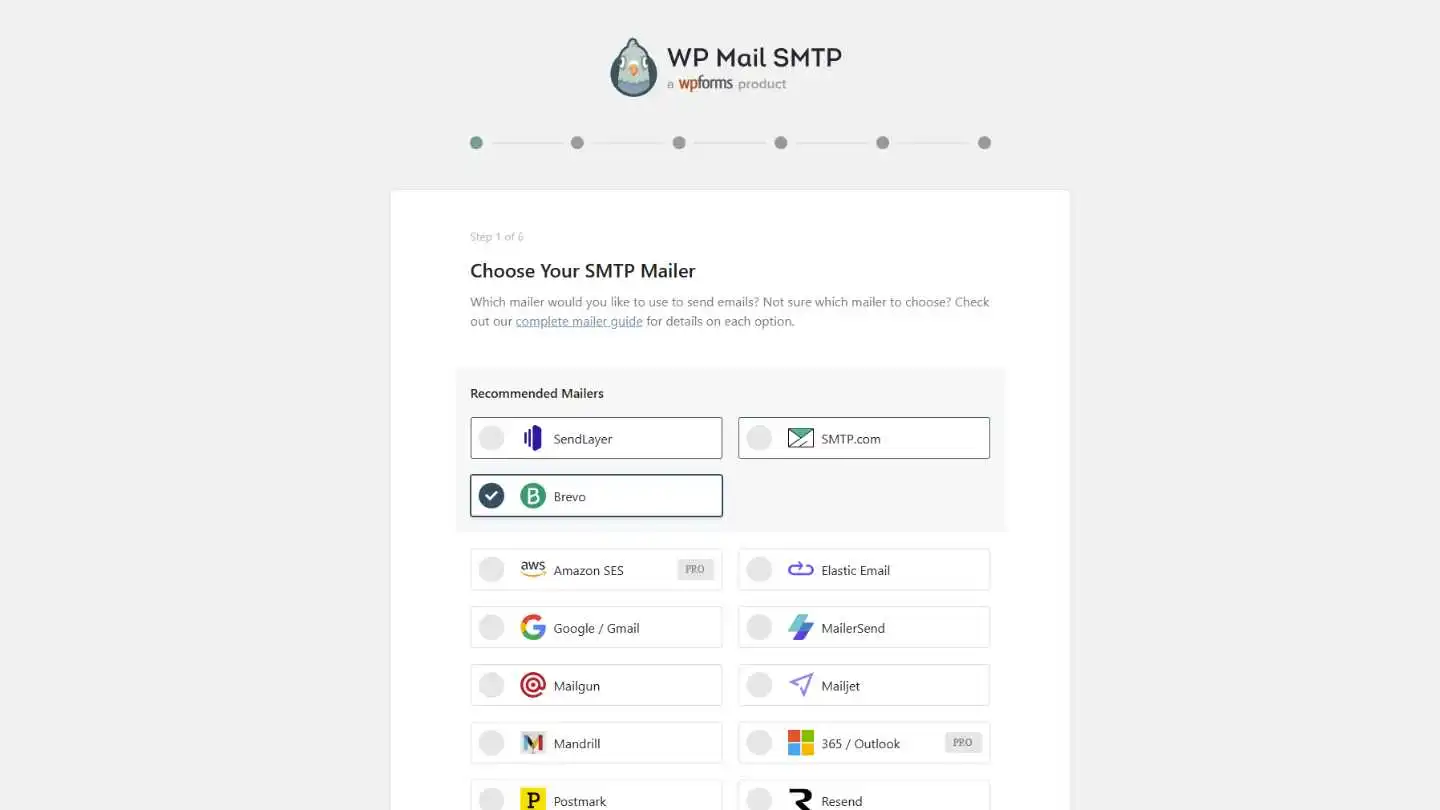
In WPForms → Edit your form → Settings → Notifications, check the "Send To" field. By default it uses {admin_email} — this pulls from WordPress → Settings → General. If that email is old or wrong, change it
Check for typos — even one wrong letter means nothing arrives
If sending to multiple people, separate addresses with commas only: alex@site.com, jane@site.com — not spaces or semicolons
Check the "From Email" — it must be on your own domain (like forms@yourdomain.com), not Gmail or Yahoo
Make sure Send To and From Email are different — using the same address for both can cause errors or trigger spam filters
Fix #4 — Turn Off "Optimize Email Sending"
WPForms has a setting that queues emails in the background instead of sending immediately. On low-traffic sites, this means emails can take hours or never arrive at all.
Steps:
Go to WPForms → Settings → Email tab
Find "Optimize Email Sending" in the Sending section
Toggle it OFF
Click Save Settings
Submit a test entry — emails should now send immediately
Fix #5 — Form won't submit at all: Fix JavaScript Conflicts
If the form hangs, shows "Form token is invalid," or says "WPForms has detected an issue with JavaScript" — a caching plugin is probably breaking the form's code.
Steps:
If you use a caching plugin (LiteSpeed Cache, WP Rocket, W3 Total Cache, Autoptimize), go to its settings and turn off JavaScript minification
Or exclude these files from minification:
/wp-content/plugins/wpforms-lite/assets/js/wpforms.min.js/wp-content/plugins/wpforms/assets/js/wpforms.min.js
Clear your cache — both in the plugin and in your browser (Ctrl+Shift+R)
If that doesn't help, deactivate plugins one at a time and test after each
Fix #6 — CAPTCHA error: Fix reCAPTCHA or hCaptcha Conflicts
If visitors see "This field is required" on the CAPTCHA even after completing it, the CAPTCHA is loading twice — once from WPForms and once from another plugin or your theme.
Steps:
Go to WPForms → Settings → CAPTCHA tab
Turn on "No-Conflict Mode"
Save and test
If that doesn't work, check if another plugin is also loading reCAPTCHA and deactivate it
Fix #7 — Emails in spam: Set Up Domain Authentication
If emails arrive but land in spam, your domain doesn't have the right authentication records. Gmail, Yahoo, and Outlook all got much stricter about this in 2024.
Steps:
If you haven't already, install WP Mail SMTP and connect to Brevo or Mailgun (Fix #1)
Add SPF, DKIM, and DMARC DNS records — your email service walks you through this
Make sure the From Email uses your own domain
Test at mail-tester.com — aim for 9/10 or higher
Fix #8 — SMTP installed but not working: Check Your SMTP Plugin Is Properly Configured
A common mistake: people install WP Mail SMTP but leave it on the default "PHP" mailer, which doesn't improve anything. You need to actually connect it to a real email service.
Steps:
Go to WP Mail SMTP → Settings and check which mailer is selected. If it says "PHP" or "Default," that's the problem — select Brevo, Mailgun, or another real service
Double-check your API key or credentials — one wrong character causes failure
If using Gmail, you need an App Password, not your regular password
Check the Email Log (WP Mail SMTP → Tools → Email Log) for specific error messages
If your service isn't working, try Brevo — it's free and works with virtually all hosts
Fix #9 — HIDDEN CAUSES: Everything looks right but emails still vanish
SMTP works, notifications are on, settings look correct — but emails disappear. Check these:
"Force From Email" is off in your SMTP plugin — turn it on so it overrides WPForms' From address with your verified sender
WPForms or WordPress is out of date — go to Dashboard → Updates and update everything
Same-domain routing — sending to your own domain but email hosted on Google Workspace/M365? Ask your host to set routing to "Remote"
Plugin interference — deactivate all plugins except WPForms + SMTP, test, reactivate one by one
GoDaddy or managed hosting — some hosts cause WPForms to hang on submission. Check WPForms docs for hosting-specific fixes
Recipient blocking — corporate email servers can silently filter. Ask them to whitelist your domain
Safety Net: Turn On Email Logging
Whatever the cause, turn on email logging so you can see exactly what's sending and what's failing:
Go to WP Mail SMTP → Settings → Email Log
Enable Detailed Email Logs
Now every email attempt is recorded — you can check delivery status, see errors, and even resend failed emails
This is your safety net. Instead of guessing whether emails are sending, you can see the evidence.
Stop Finding Out Too Late
Every fix on this page works — once you know there's a problem. But most broken forms don't look broken. The visitor sees a success message. You just never receive the email.
Form Doctor monitors your forms around the clock and alerts you the moment something breaks — before you lose leads.
FAQ
Why is WPForms not sending emails? Most likely your web server's email function isn't set up properly. Install WP Mail SMTP and connect it to Brevo (free). This fixes it for the majority of sites.
WPForms shows a success message but no email arrives. Why? Check three things in order: 1) Are notifications turned on for this form? (Settings → Notifications → toggle and badge) 2) Is the Send To email address correct? 3) Do you have an SMTP plugin installed and properly configured?
What does "Form token is invalid" mean? A caching plugin is breaking WPForms' JavaScript. Turn off JavaScript minification in your caching plugin, or exclude WPForms' JS files from optimization. Clear the cache afterwards.
What does the "DEACTIVATE" badge mean in WPForms notifications? It means that specific notification has been turned off and won't send any emails. Click the badge to switch it back to "ACTIVE."
Should I turn on "Optimize Email Sending" in WPForms? No — unless you have a very high-traffic site. This setting queues emails in the background, and on most sites it causes emails to be delayed or lost entirely. Leave it off.
My SMTP test works but WPForms emails don't arrive. Why? Turn on "Force From Email" in your SMTP plugin so it overrides WPForms' From address. Also check that the Send To and From Email in your notification settings are different, and that there are no conditional logic rules blocking the notification.
WPForms emails used to work but stopped. What changed? Most likely: Gmail, Yahoo, or Outlook tightened their spam rules (2024-2025) and now reject unauthenticated emails. Set up SPF, DKIM, and DMARC records on your domain. An SMTP plugin + Brevo handles this for you.
How do I send WPForms notifications to multiple people? In the Send To field, separate email addresses with commas: alex@site.com, jane@site.com. Don't use spaces or semicolons.