
Your contact form looks fine. Someone fills it in, clicks submit, and sees a nice green "thank you" message. Everyone's happy.
Except the email never arrives.
No error message. No warning. The form just quietly stops delivering submissions to your inbox — and you don't find out until a potential customer asks why nobody replied to their enquiry.
This is one of the most common WordPress problems there is, and it's almost always fixable. We've put together a free diagnostic tool that walks you through the exact fix for your situation:
👉 Use our free CF7 Email Diagnostic Tool
But if you'd prefer to read through the fixes yourself, here are the 7 most common causes — ranked by how likely they are to be your problem. Start at #1 and work down.
Fix #1: Install an SMTP Plugin
This solves the problem for roughly 7 out of 10 sites.
WordPress has a built-in way of sending email, but it barely works. It relies on your web hosting server being set up correctly — and most aren't. Emails either get blocked entirely or vanish into thin air.
The fix is to install a plugin that replaces this broken system with a proper one. It takes about 15 minutes.
What to do:
In WordPress, go to Plugins → Add New
Search for "WP Mail SMTP" and install it (it's free)
The setup wizard will ask you to pick a mailer — choose Brevo (it's the simplest option, free for up to 300 emails a day, no credit card needed)
Follow the steps to connect your Brevo account
Once connected, go to WP Mail SMTP → Tools → Email Test and send a test
If the test email arrives in your inbox, you're done — your forms will start working
Still not working after this? Move to Fix #2.
👉 Not sure which fix applies to you? Try our free diagnostic tool — it takes 30 seconds.
Fix #2: Fix the "From" Email Address
This is the most common Contact Form 7 configuration mistake — and it catches people because it used to work fine until email providers got stricter.
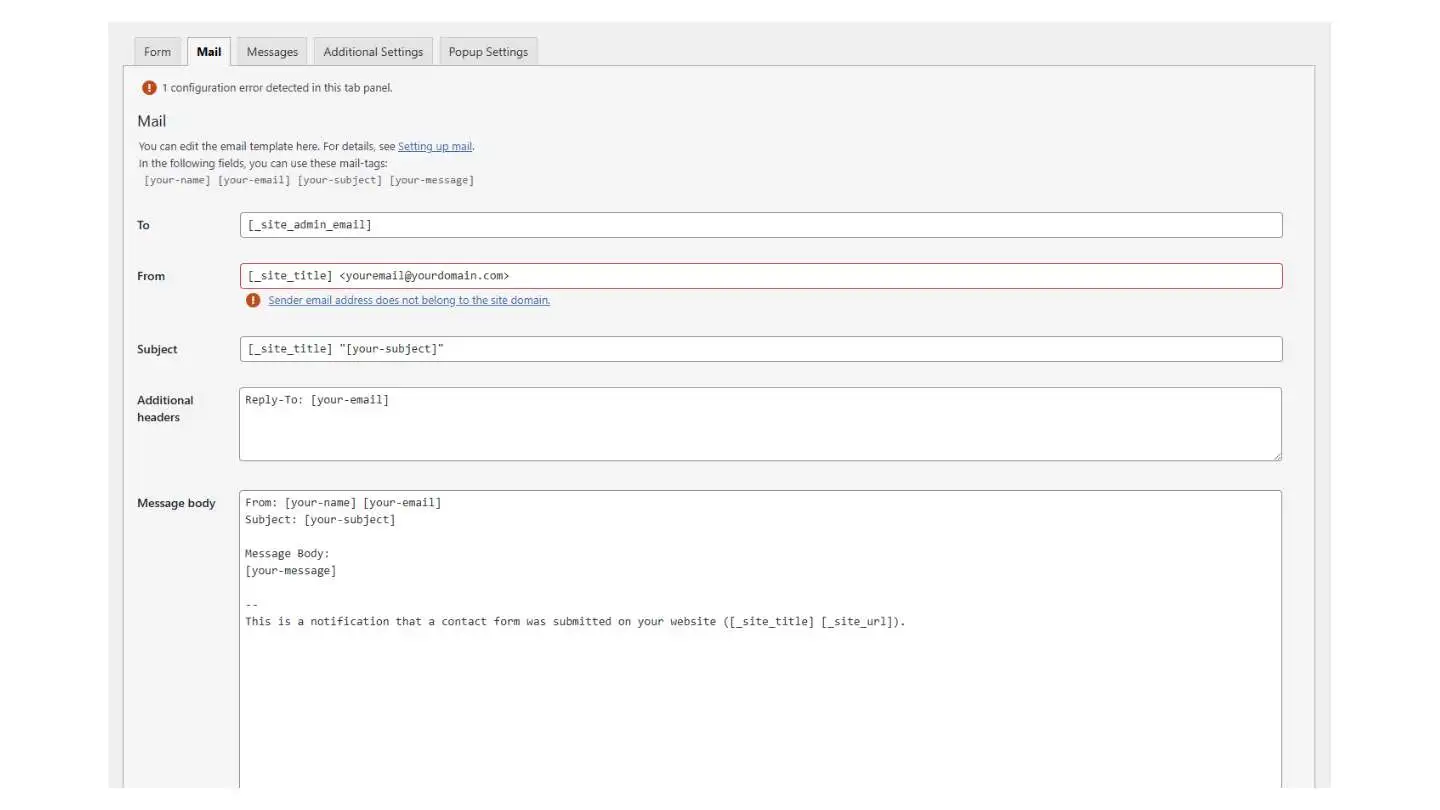
Inside CF7's settings, there's a "From" field that controls who the email appears to come from. A lot of people (and old tutorials) put the visitor's email address here, using the tag [your-email]. The idea is that when someone fills in your form, the email looks like it came from them.
The problem: email providers now treat this as suspicious. Your server is sending an email that claims to be from a Gmail address, but it's clearly not coming from Gmail. That looks like someone faking a return address — so the email gets silently deleted.
What to do:
Go to Contact → Contact Forms in WordPress
Click Edit on your form, then the Mail tab
Change the From field to:
Your Site Name <forms@yourdomain.com>— it must be an email on your own domainIn the Additional Headers box, add:
Reply-To: [your-email]Save and test
The Reply-To line means you can still hit "Reply" in your inbox and it goes to the visitor. You get the same result, but without the spoofing problem.
👉 Still stuck? Our diagnostic tool will pinpoint the exact issue.
Fix #3: Check CF7's Built-in Error Warnings
Contact Form 7 actually has a built-in error checker — but most people never notice it because the warnings are easy to miss.
What to do:
Go to Contact → Contact Forms in WordPress
Look at the top of the page — is there a red or yellow warning banner? If yes, click it
Click Edit on your form → Mail tab
Look for any fields highlighted in red — that's where the problem is
What the most common warnings mean:
"Invalid mailbox syntax" — the email address in your To or From field is formatted wrong. It should be either you@yourdomain.com or Your Name <you@yourdomain.com> with angle brackets. A very common mistake is writing the name and email without the brackets.
"Sender email does not belong to the site domain" — you're using a Gmail, Yahoo, or Hotmail address in the From field. Change it to an email on your own website's domain.
"Possible empty field" — you're using a form tag in the Subject line (like [your-subject]) but that field isn't required, so it could be sent blank. Either make it required or type a fixed subject.
Empty message body — if the big text area in the Mail tab is blank, paste your tags back in: [your-name], [your-email], [your-message].
👉 Want a faster way to diagnose this? Try our free CF7 troubleshooting tool.
Fix #4: Orange Message? It's a Spam Filter Problem
If your form shows an orange message when someone submits, the email isn't even being attempted — the form is blocking the submission because it thinks it's spam.
The most common cause: reCAPTCHA v3. This is the invisible version that gives every visitor a "trust score." It blocks real people far too often.
What to do:
Go to Contact → Integration in WordPress
If you see reCAPTCHA v3 keys set up, remove them
Set up reCAPTCHA v2 instead (the "I'm not a robot" checkbox) or switch to Cloudflare Turnstile
If you have anti-spam plugins like Akismet or CleanTalk, try deactivating them temporarily and testing
When CF7 switched its default from reCAPTCHA v2 to v3, a huge number of sites started silently rejecting real visitors without anyone realising. If you recently updated CF7, this is very likely your problem.
👉 Our diagnostic tool covers this — just pick "Orange message" in the first question.
Fix #5: Form Hangs or Spinner Never Stops
If the form spins for a while and then fails (or nothing happens at all), the form can't communicate with your WordPress server. This is usually caused by a security plugin or firewall blocking the connection.
What to do:
Type this into your browser:
yoursite.com/wp-json/contact-form-7/v1/contact-forms— if you get an error, the connection is blockedDeactivate security plugins one at a time (Wordfence, Sucuri, iThemes Security) and test your form after each one
If you use a caching plugin (LiteSpeed Cache, WP Rocket), exclude
/wp-json/from the cacheIf you use Cloudflare, check your firewall rules aren't blocking
/wp-json/*
👉 Our diagnostic tool helps you narrow this down step by step.
Fix #6: Emails Land in Spam
If the email arrives but lands in your spam folder, your domain isn't properly set up to prove it's allowed to send email. Email providers see an unverified sender and assume the worst.
What to do:
Set up SPF, DKIM, and DMARC records in your domain's DNS — your email delivery service (Brevo, Mailgun, etc.) will walk you through adding these
Make sure the From address in CF7 uses your own domain, not Gmail or Yahoo
Test your setup at mail-tester.com — aim for a score of 9/10 or higher
If you haven't done Fix #1 yet (installing an SMTP plugin), do that first — it's much harder to pass spam filters without a proper email delivery service.
👉 Use our diagnostic tool to check if this is your issue.
Fix #7: Everything Looks Fine But Emails Still Vanish
This is the hardest one. Your SMTP test works, CF7 shows no errors, the form shows success — but emails randomly disappear.
Check these hidden causes:
"Force From Email" is turned off. Your SMTP plugin has a setting called "Force From Email." If it's off, CF7 might be sending with a different From address than your SMTP service expects. The test email works because it uses the right address. Turn this setting on.
Same-domain email routing. If you're sending to an email on your own domain (like hello@yourdomain.com) but your email is hosted by Google Workspace or Microsoft 365, your server might try to deliver it to itself instead of sending it externally. Ask your hosting provider to set email routing to "Remote."
Plugin interference. Another plugin might be secretly modifying WordPress's email system. Deactivate everything except CF7 and your SMTP plugin, test, then reactivate one by one.
WP-Cron is broken. Some SMTP plugins queue emails instead of sending them immediately, and rely on WordPress's background scheduler. If it's disabled, emails sit in the queue forever. Check your SMTP plugin for a "Queue" or "Pending" section.
The recipient's email server is blocking it. Everything can be correct on your end, but corporate email servers can still silently filter the message. Ask the recipient to check their quarantine filters.
👉 This is exactly the kind of problem our diagnostic tool was built for. It walks you through each hidden cause.
One More Thing: Save Your Submissions as a Backup
Whatever the cause of your email problems, there's one thing every CF7 user should do: install the free Flamingo plugin.
Flamingo saves every form submission directly to your WordPress database — even if the email fails to deliver. Go to Plugins → Add New, search "Flamingo", and activate it. Your submissions will appear under Flamingo → Inbound Messages.
This means you'll never lose a lead again, even during an email outage.
Stop Finding Out Too Late
All of these fixes work — once you know there's a problem. But that's the catch: most broken contact forms don't look broken. The visitor sees a success message. You just don't receive the email.
You might not notice for days. Or weeks. Or until a frustrated potential customer contacts you through a different channel to ask why you never replied.
Form Doctor monitors your contact forms around the clock. We run automated test submissions on a schedule, and the moment something fails, you get an alert. You find out in minutes, not weeks.
Start monitoring your forms for free →
Frequently Asked Questions
Why is my Contact Form 7 not sending emails? The most common cause is that WordPress's built-in email system isn't working properly on your hosting server. Install the free WP Mail SMTP plugin and connect it to Brevo or Mailgun. This fixes it for most sites.
The form shows a success message but I never get the email. Why? The form processed the submission, but the email failed silently. Install an SMTP plugin, check your spam folder, and make sure the From address in CF7 uses your own domain — not [your-email] or a Gmail address.
What does the orange message in Contact Form 7 mean? It means the submission was rejected as spam. This is usually caused by reCAPTCHA v3. Switch to reCAPTCHA v2 (the checkbox version) or Cloudflare Turnstile.
What should I put in the "From" field? An email on your own domain: Your Site Name <forms@yourdomain.com>. Never use a visitor's email address. Put Reply-To: [your-email] in Additional Headers instead.
My SMTP plugin test works but CF7 doesn't. Why? Turn on "Force From Email" in your SMTP plugin settings. This makes the plugin override whatever From address CF7 uses, ensuring it matches your verified sender.
How do I stop form emails going to spam? Add SPF, DKIM, and DMARC DNS records to your domain. Use a proper email delivery service like Brevo or Mailgun. Test at mail-tester.com — aim for 9/10 or above.
Can I save form submissions without email? Yes. Install the free Flamingo plugin. It saves every CF7 submission to your WordPress database regardless of whether the email delivers.
How do I know if my form breaks in the future? Use Form Doctor — it monitors your forms automatically and alerts you the moment something stops working.