Your WPForms contact form looks like it's working. Someone fills it in, clicks submit, sees a "thanks for contacting us" message. Everyone's happy.
Except you never get the email.
No error. No warning. The form just quietly stops sending you notifications — and you don't find out until someone asks why you never responded to their enquiry.
This is one of the most common WordPress problems, and it's almost always fixable. We've built a free diagnostic tool that walks you through the exact fix for your situation:
👉 Use our free WPForms Email Diagnostic Tool
If you'd prefer to read through the fixes, here are the 9 most common causes — ranked by how likely they are to be your problem. Start at #1 and work down.
Fix #1: Install an SMTP Plugin
This fixes the problem for roughly 7 out of 10 sites.
WordPress has a built-in way of sending email, but it barely works. Most hosting providers don't set it up properly, so emails silently vanish. WPForms hands the email to WordPress, WordPress tries to send it, and it just disappears.
What to do:
Go to Plugins → Add New, search "WP Mail SMTP" and install it (free)
The wizard asks you to pick a mailer — choose Brevo (simplest option, free, no credit card)
Follow the steps to connect your Brevo account
Go to WP Mail SMTP → Tools → Email Test and send a test
If it arrives, you're done
Still not working? Move to Fix #2.
👉 Not sure which fix applies? Try our free diagnostic tool — takes 30 seconds.
Fix #2: Check That Notifications Are Turned On
This one catches more people than you'd expect. Every WPForms form has its own notification toggle, and it can get switched off accidentally — while testing, after a plugin update, or by someone else editing the form.
What to do:
Go to WPForms → All Forms → Edit your form
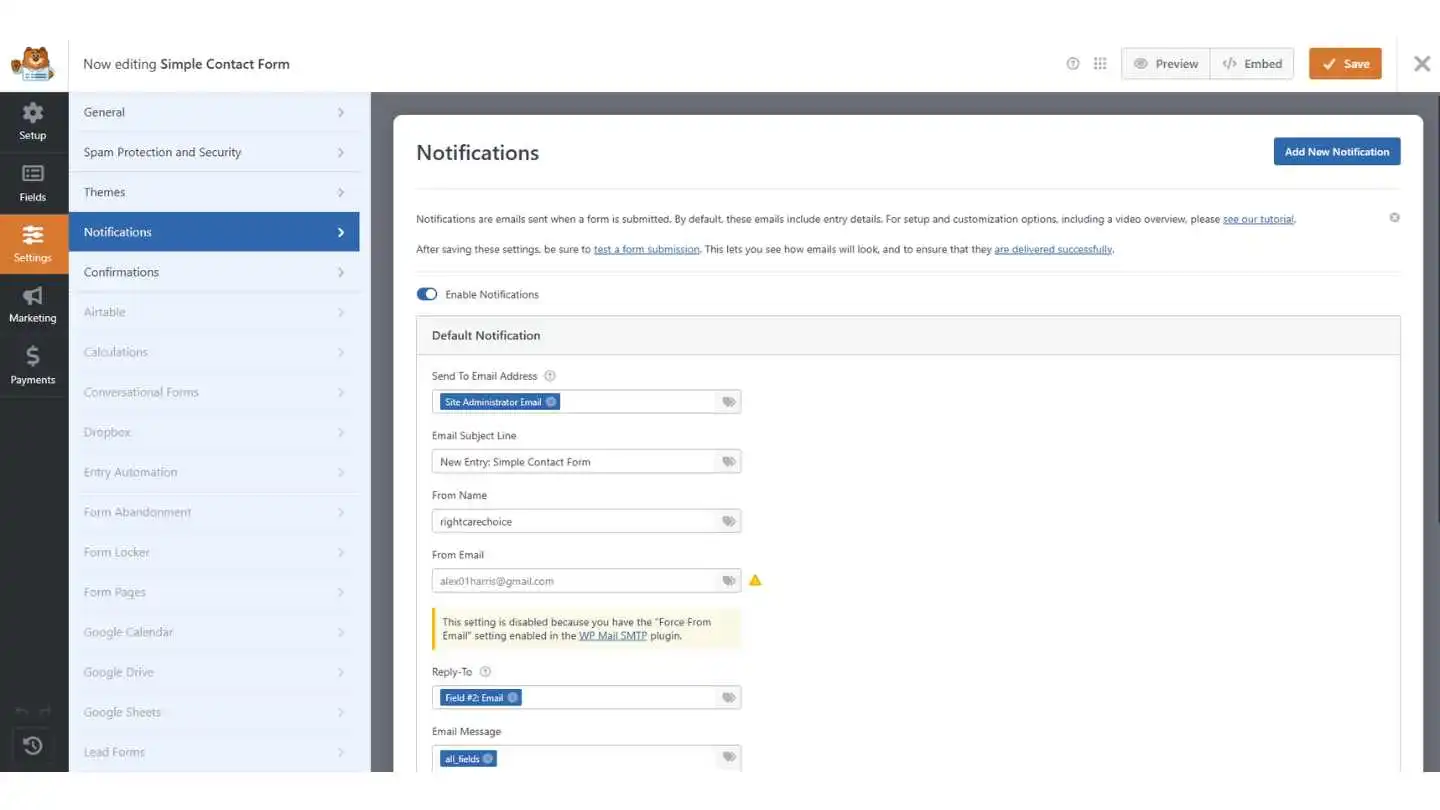
Click Settings → Notifications in the left sidebar
Check the "Enable Notifications" toggle is ON
Check the badge next to each notification — if it says "DEACTIVATE" (greyed out), click it to switch it back to "ACTIVE"
Save and submit a test
If you have multiple forms, check each one — they all have independent notification settings.
👉 Our diagnostic tool checks for this automatically.
Fix #3: Check Your Email Addresses for Mistakes
A single typo is enough to break everything. WPForms won't warn you about a misspelled email — it just sends to the wrong place (or nowhere).
What to do:
In your notification settings, check the "Send To" field character by character. By default it uses
{admin_email}— check what that's set to in WordPress → Settings → GeneralIf sending to multiple people, separate with commas only:
alex@site.com, jane@site.com. Spaces or semicolons won't workCheck the "From Email" is on your own domain — not Gmail or Yahoo
Make sure Send To and From Email are different — the same address for both can cause errors or spam filtering
Fix #4: Turn Off "Optimize Email Sending"
WPForms has a setting that queues emails in the background instead of sending them straight away. On most websites, this causes emails to be delayed by hours — or lost entirely.
What to do:
Go to WPForms → Settings → Email tab
Find "Optimize Email Sending" and toggle it OFF
Click Save Settings
This setting is off by default. If someone turned it on, turn it back off.
Fix #5: Fix JavaScript Conflicts (Form Won't Submit)
If your form hangs when you click submit, shows "Form token is invalid," or mentions a JavaScript issue — a caching plugin is almost certainly breaking the form's code.
What to do:
If you use a caching plugin, turn off JavaScript minification in its settings
Or exclude these files:
/wp-content/plugins/wpforms-lite/assets/js/wpforms.min.jsand/wp-content/plugins/wpforms/assets/js/wpforms.min.jsClear your cache (in the plugin and your browser — Ctrl+Shift+R)
If that doesn't help, deactivate plugins one at a time and test after each
Fix #6: Fix CAPTCHA Conflicts
If visitors see "This field is required" on the CAPTCHA even after completing it, the CAPTCHA code is loading twice on the page and conflicting with itself.
What to do:
Go to WPForms → Settings → CAPTCHA tab
Turn on "No-Conflict Mode"
Save and test
This tells the browser to only load the CAPTCHA from WPForms, ignoring duplicates from other plugins or your theme.
Fix #7: Fix Emails Landing in Spam
If emails arrive but go to spam, your domain isn't properly authenticated. Gmail, Yahoo, and Outlook all tightened their rules in 2024 — emails without authentication are much more likely to be filtered.
What to do:
Install an SMTP plugin and connect to Brevo or Mailgun (if you haven't already — Fix #1)
Add SPF, DKIM, and DMARC DNS records — your email service walks you through this
Make sure the From Email uses your own domain
Test at mail-tester.com — aim for 9/10 or higher
👉 Use our diagnostic tool to check if deliverability is your issue.
Fix #8: Configure Your SMTP Plugin Properly
A common mistake: installing WP Mail SMTP but leaving it on the default "PHP" mailer, which doesn't actually improve anything. You need to connect it to a real email service.
What to do:
Go to WP Mail SMTP → Settings and check which mailer is selected. If it says "PHP" or "Default," that's the problem
Select Brevo, Mailgun, or another proper service and complete the setup
If using Gmail, you need an App Password — not your regular password
Check the Email Log (WP Mail SMTP → Tools) for specific error messages
Fix #9: Hidden Causes When Nothing Else Works
SMTP works, notifications are on, settings look correct — but emails still vanish. Check these:
"Force From Email" is off in your SMTP plugin → turn it on
WPForms or WordPress is out of date → update everything
Conditional logic on the notification is blocking certain submissions → check the bottom of your notification settings
Same-domain routing → sending to your own domain but email hosted elsewhere? Ask your host to set routing to "Remote"
Plugin interference → deactivate all except WPForms + SMTP, test, reactivate one by one
GoDaddy → some managed hosts cause WPForms to hang on submission, check WPForms docs
👉 This is exactly the scenario our diagnostic tool was built for.
Safety Net: Turn On Email Logging
Whatever the cause, enable email logging so you can see what's actually sending:
Go to WP Mail SMTP → Settings → Email Log and enable Detailed Email Logs. Now every email attempt is recorded with status, timestamps, and error messages. No more guessing.
Stop Finding Out Too Late
Every fix on this page works — once you know there's a problem. But most broken forms don't look broken. The visitor sees a success message. You just don't get the email.
You might not notice for days. Or weeks. Or until a frustrated customer contacts you through a different channel.
Form Doctor monitors your forms around the clock and alerts you the moment something breaks — before you lose leads.
Start monitoring your forms for free →
FAQ
Why is WPForms not sending emails? Most likely your web server's email function isn't working properly. Install WP Mail SMTP and connect it to Brevo (free). This fixes it for the majority of sites. Also check that notifications are turned on for your specific form.
WPForms shows a success message but no email arrives. Why? Check three things: 1) Are notifications toggled on? (look for the ACTIVE/DEACTIVATE badge) 2) Is the Send To email correct? 3) Do you have an SMTP plugin installed and properly configured — not just installed, but connected to a real email service?
What does "Form token is invalid" mean? A caching plugin is breaking WPForms' JavaScript. Turn off JS minification in your caching plugin, or exclude WPForms' JS files. Clear the cache afterwards.
What does the "DEACTIVATE" badge mean? That notification is turned off. Click the badge to switch it to "ACTIVE" so emails start sending again.
Should I turn on "Optimize Email Sending"? No — unless you have a very high-traffic site. On most sites it causes delays or lost emails. Leave it off.
WPForms emails used to work but stopped. What changed? Gmail, Yahoo, and Outlook tightened their spam rules in 2024-2025 and now reject unauthenticated emails. Set up SPF, DKIM, and DMARC records. An SMTP plugin handles this for you.
How do I send notifications to multiple people? In the Send To field, separate addresses with commas: alex@site.com, jane@site.com. Don't use spaces or semicolons.
My SMTP test works but WPForms emails don't arrive. Why? Turn on "Force From Email" in your SMTP plugin. Also check that Send To and From Email are different, and that there's no conditional logic blocking the notification.